Polarion Copilot, Tested: Solid Checks Today, a Real Platform Since 2606
In December I couldn't benchmark Polarion Copilot. Now I have: three built-in checks measured on 2606, why the new Copilot API is the real step, and why Copilot and a plugin like avaAssistant work side by side.

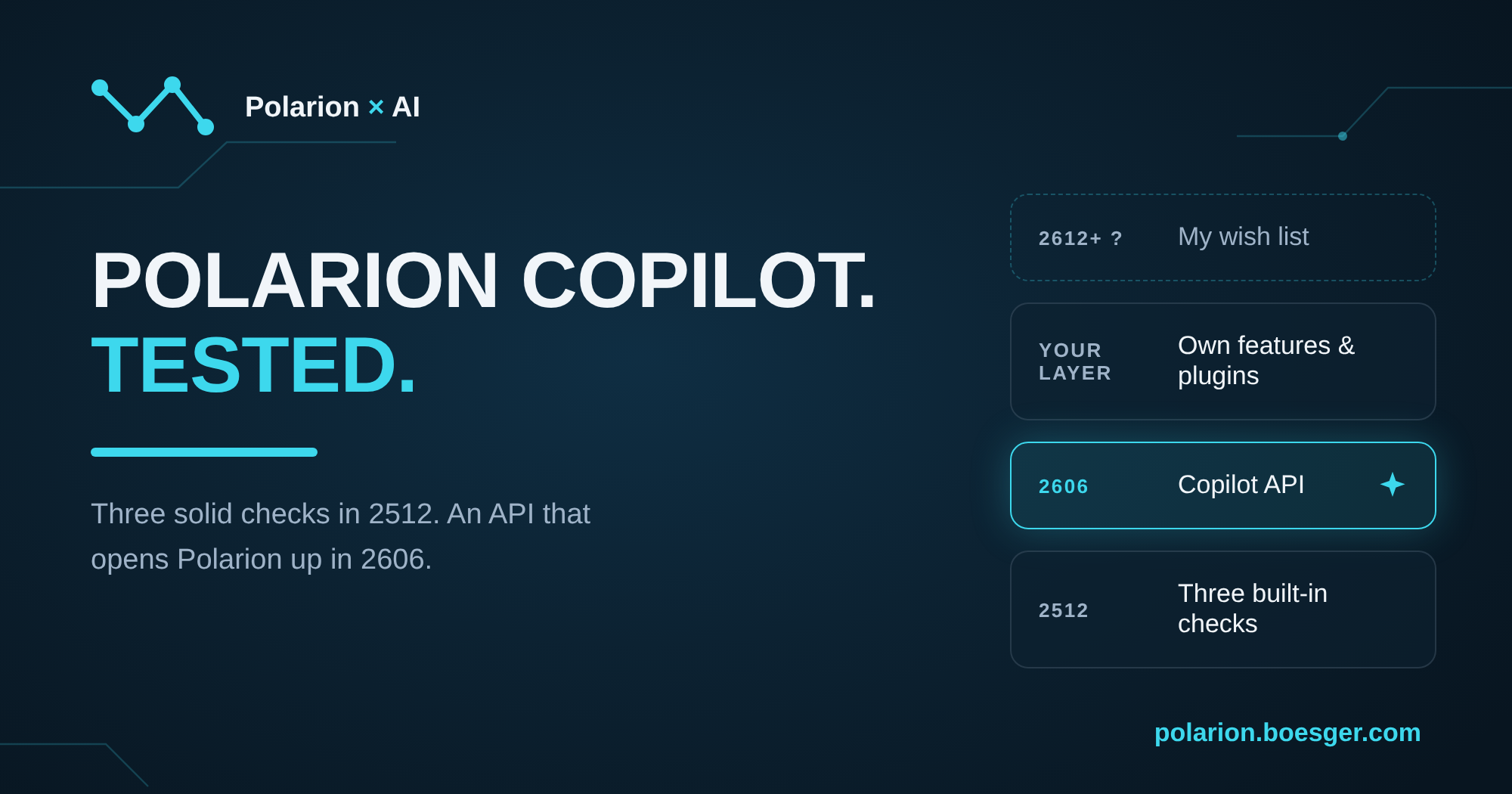
In December I wrote that I couldn't benchmark Polarion Copilot yet. Ten months later I have a Polarion 2606 container and a few days of measurements. Here is what it does today, why the 2606 API is the part I'm most excited about, and why I don't think anyone has to choose between Copilot and a plugin.
For: Polarion admins, developers and quality leads. Tested on Polarion 2606, October 2026. Disclosure: I also build avaAssistant, an AI plugin for Polarion, more on that in section 5.
Contents
- How I tested it
- The three built-in checks in practice
- Focused by design: what the checks send to the model
- The highlight: the Copilot API in 2606
- Copilot and avaAssistant: two layers, not a choice
- Getting the most out of Copilot
- What I'd like to see in 2612 and beyond
How I tested it
When Polarion 2512 shipped, Copilot wasn't part of the Early Access program, so all I could write was "apply healthy skepticism" (my 2512 post). That's an easy sentence to write and a useless one to read. So this time I wanted numbers.
The setup:
- Polarion 2606 in my Docker setup, with a Copilot licence.
- A small demo project with system and software requirements, test cases and a few planted problems: a duplicate, a contradiction, and a requirement whose linked test case doesn't cover all of it.
- An OpenAI model instead of Azure. Azure OpenAI ships built in, and since 2606 Siemens supports custom LLM connectors on-prem as a Java bundle. The SDK even has an example, so I wrote a small connector for testing.
- The AI audit log open in a second window. Polarion logs every LLM call with the full prompt and the token count. For a test like this, that transparency is gold.
Then I ran every feature on the same items and wrote down what went in and what came out.
The three built-in checks in practice
Copilot lives behind a sparkle icon in the work item editor, the table view and documents. Click it and you get three sidebars, the same three Siemens announced with 2512. No per-project setup, it's just there. Admins can tune the Similarity results and the Consistency link depth.
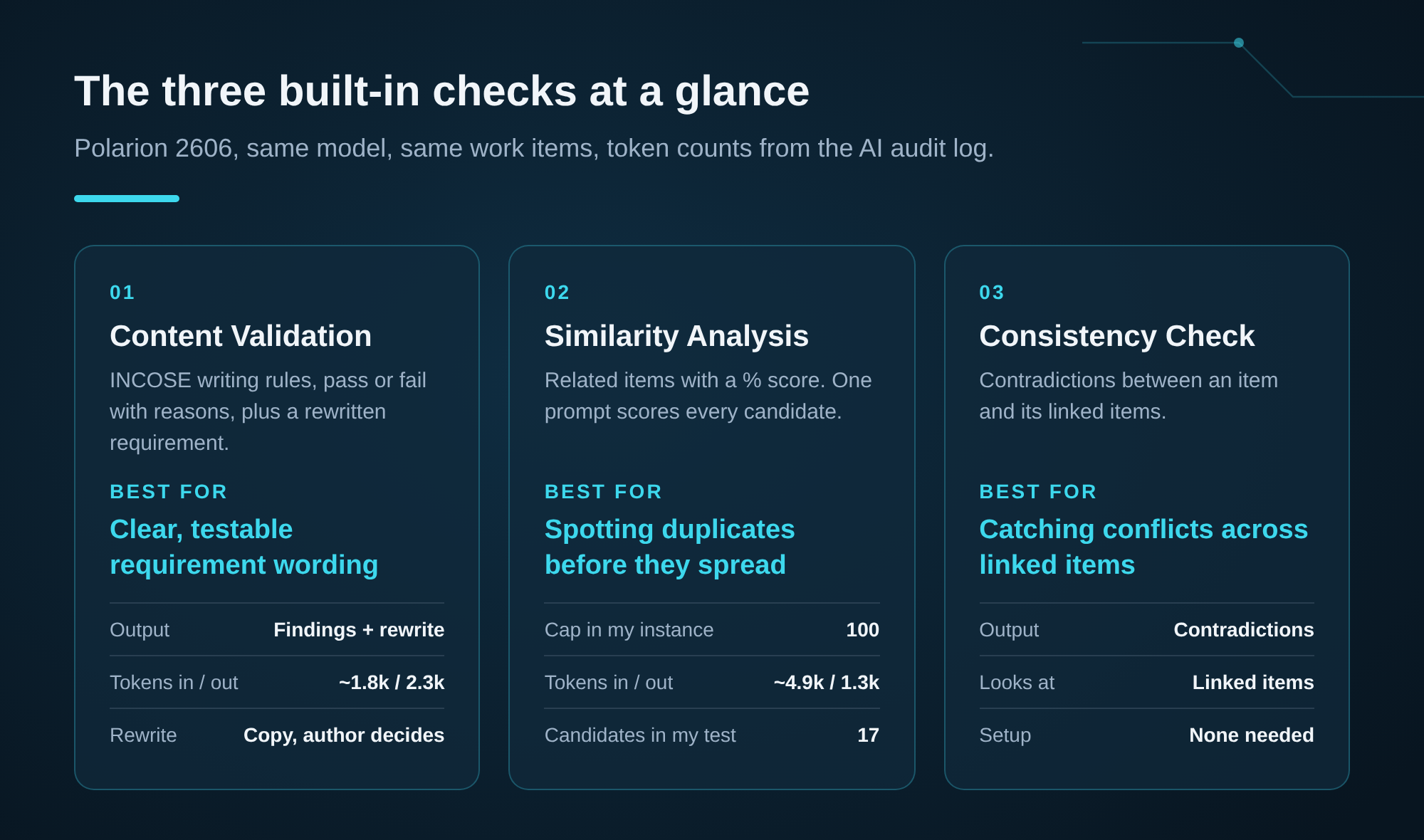
Content Validation checks a requirement against the INCOSE guide for writing requirements. In my runs it evaluated 33 rules each time, each with pass or fail and a short explanation, and then proposed a rewritten requirement. Roughly 1.8k tokens in and 2.3k out.
This is my favourite of the three. The explanations are good enough to teach someone why "the system shall be user-friendly" is a bad requirement, and the rewrite is usually a real improvement. You copy it into the field yourself, which keeps the author in control of what ends up in the requirement.
Similarity Analysis lists other work items with a similarity percentage, and it found my planted duplicate. The audit log shows how it works: one prompt sends the item and the candidates to the model and asks it to score them. That's why the candidate set is capped (100 in my instance), and why 17 candidates already meant about 4.9k tokens in and 1.3k out. Scores move a little between runs (55% and 52% for the same pair), so read them as a ranking, not as an exact number.
Consistency Check looks at the linked items and reports contradictions. It found my planted contradiction in every run I did. It didn't flag the requirement whose test case doesn't cover it, and the reason for that is the most interesting finding of the whole test.
Focused by design: what the checks send to the model
Every built-in feature sends the model the description. Content Validation sends nothing else. Similarity and Consistency add the ID and type, for the item and for every candidate or linked item.
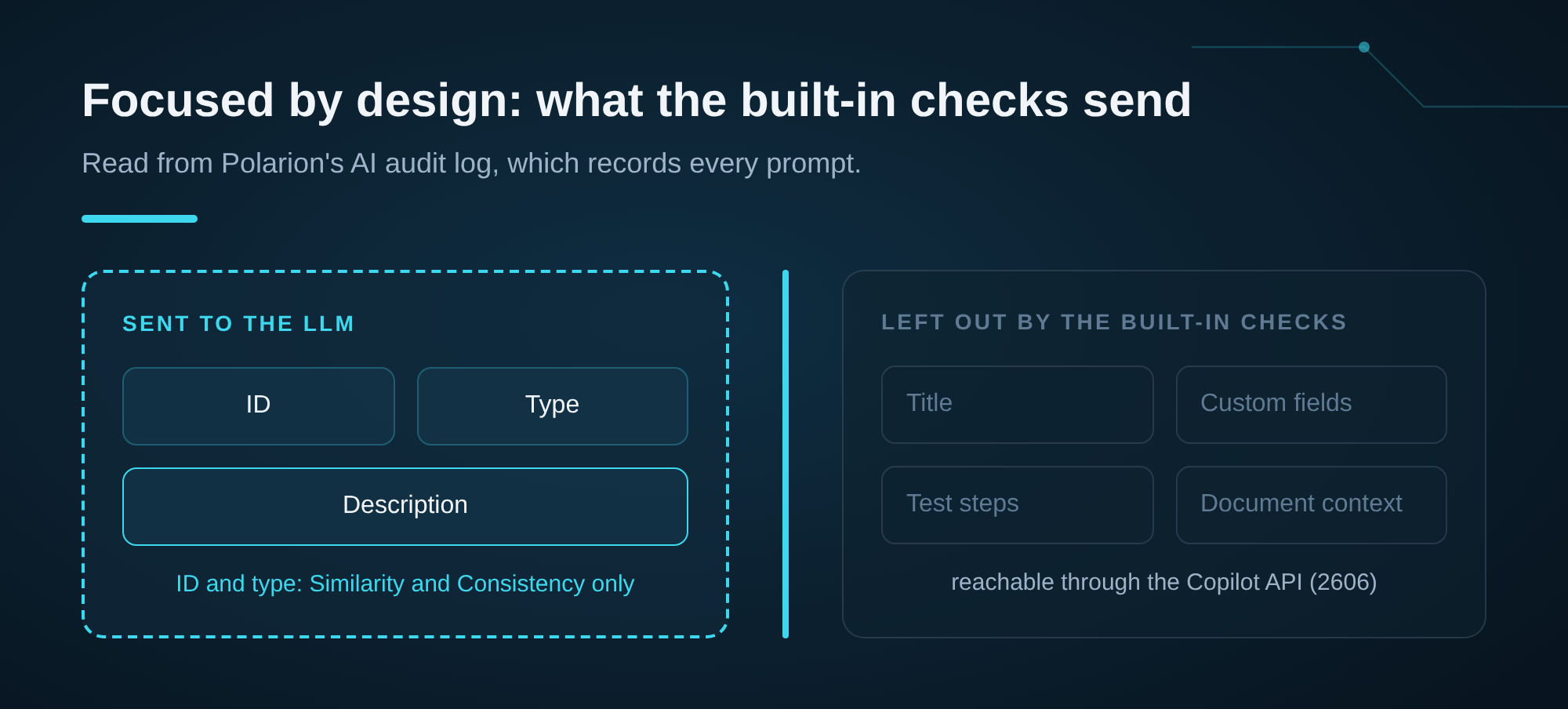
So when the Consistency Check doesn't report a coverage gap, it isn't failing. It never sees the test steps. That isn't what it's for.
I think that's a deliberate and good choice. Polarion's customers are in medtech, automotive and aerospace, where every byte that leaves the server needs a justification. Data minimisation is a feature, and it makes the built-in checks easy to approve. It also means they stay focused: they're great at the wording of a requirement, and they leave project-specific rules in custom fields, test steps or document structure to whatever you build next. Which is exactly where 2606 comes in.
The highlight: the Copilot API in 2606
Polarion 2606 added something that got far less attention than the sidebars: the Polarion Copilot API, a way to run your own LLM calls from inside Polarion. Velocity, the JavaScript scripting context, REST and Java all get the same model (Javadoc). For me, this is the most important AI change in Polarion so far.
The concept is small. You define a use case: a list of messages with optional placeholders and an output format (text, JSON or a JSON schema). You run it against a configured model with the caller's permissions. In Velocity that looks like this:
## $reqText: the requirement text as a plain String
#if( $aiService.canUse() )
#set( $b = $aiService.createUseCase() )
#set( $b = $b.message("system", "You are a requirements reviewer.") )
#set( $b = $b.message("user", "Three findings for: $[req]") )
#set( $r = $b.build().createRequest().parameter("req", $reqText).execute() )
#if( !$r.error() )
  $esc.html($r.content())
#else
  $esc.html($r.error().message())
#end
#end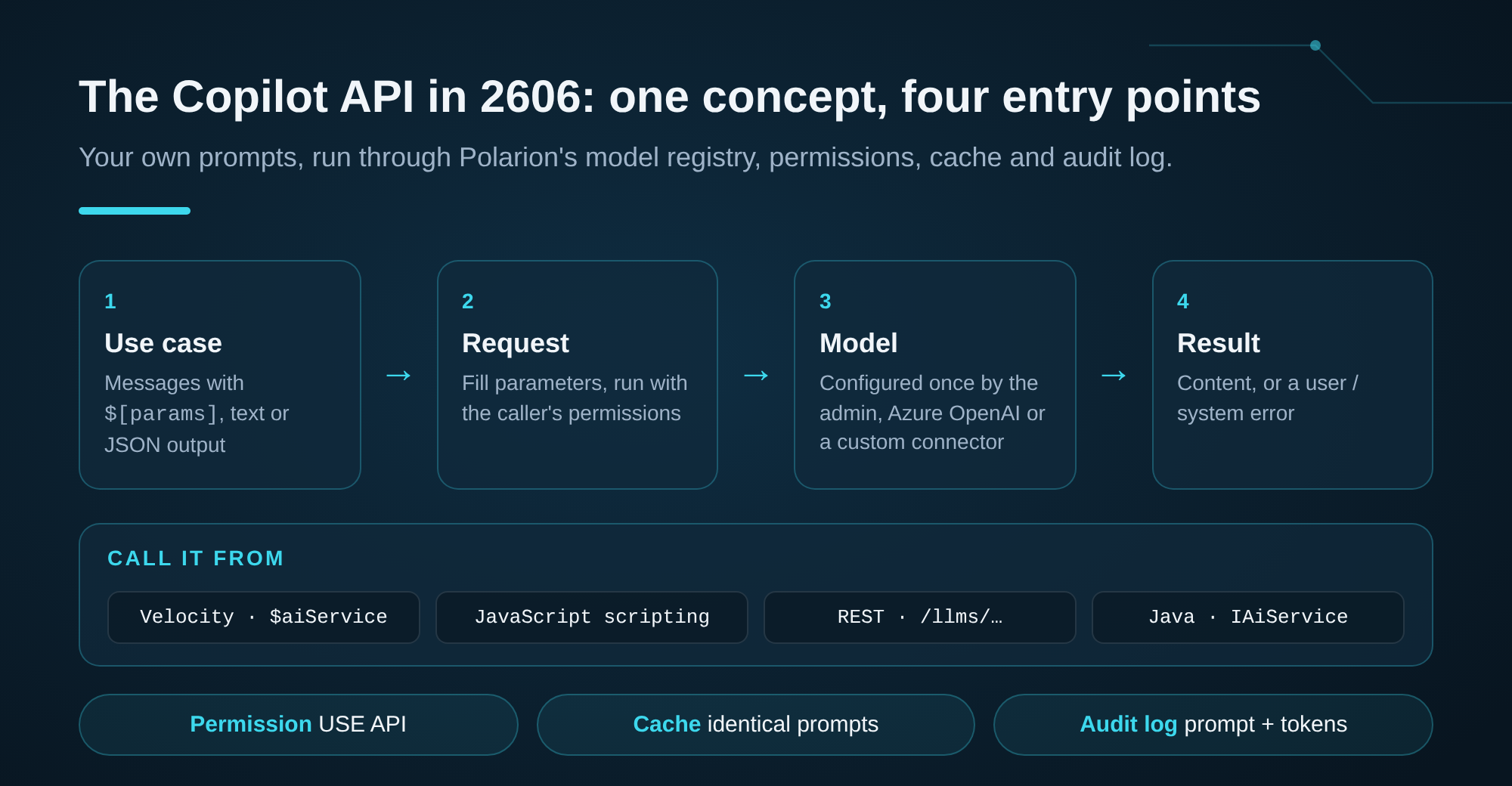
What I observed:
- Caching: an identical request comes back instantly from Polarion's response cache, without spending tokens.
- Bulk: I classified 64 requirements in one call, and the output matched the JSON schema.
- Errors: a wrong model, schema or payload gets a clear 400. A rejection from the provider shows up as a generic 500, with the cause in the server log.
What I'd like to see next: streaming for long answers (calls are synchronous today), tool calling, and token usage in the response. None of that is a blocker for a first version. The cache is worth knowing about: perfect for widgets that render the same page fifty times, and something to keep in mind when you deliberately want a fresh answer.
And look at what comes with it: the "Polarion Copilot: USE API" permission, a licence per user, and every call in the AI audit log with prompt and tokens. That's exactly the list a compliance review asks for, and exactly what's painful to build yourself. With 2606, Copilot stops being three features and becomes a foundation. Anything that acts on results, writes back or creates links can now be built on top, with the model configured once by the admin.
Copilot and avaAssistant: two layers, not a choice
Running both side by side, the most useful insight wasn't which one is better. It was that they answer different questions, and they don't get in each other's way.
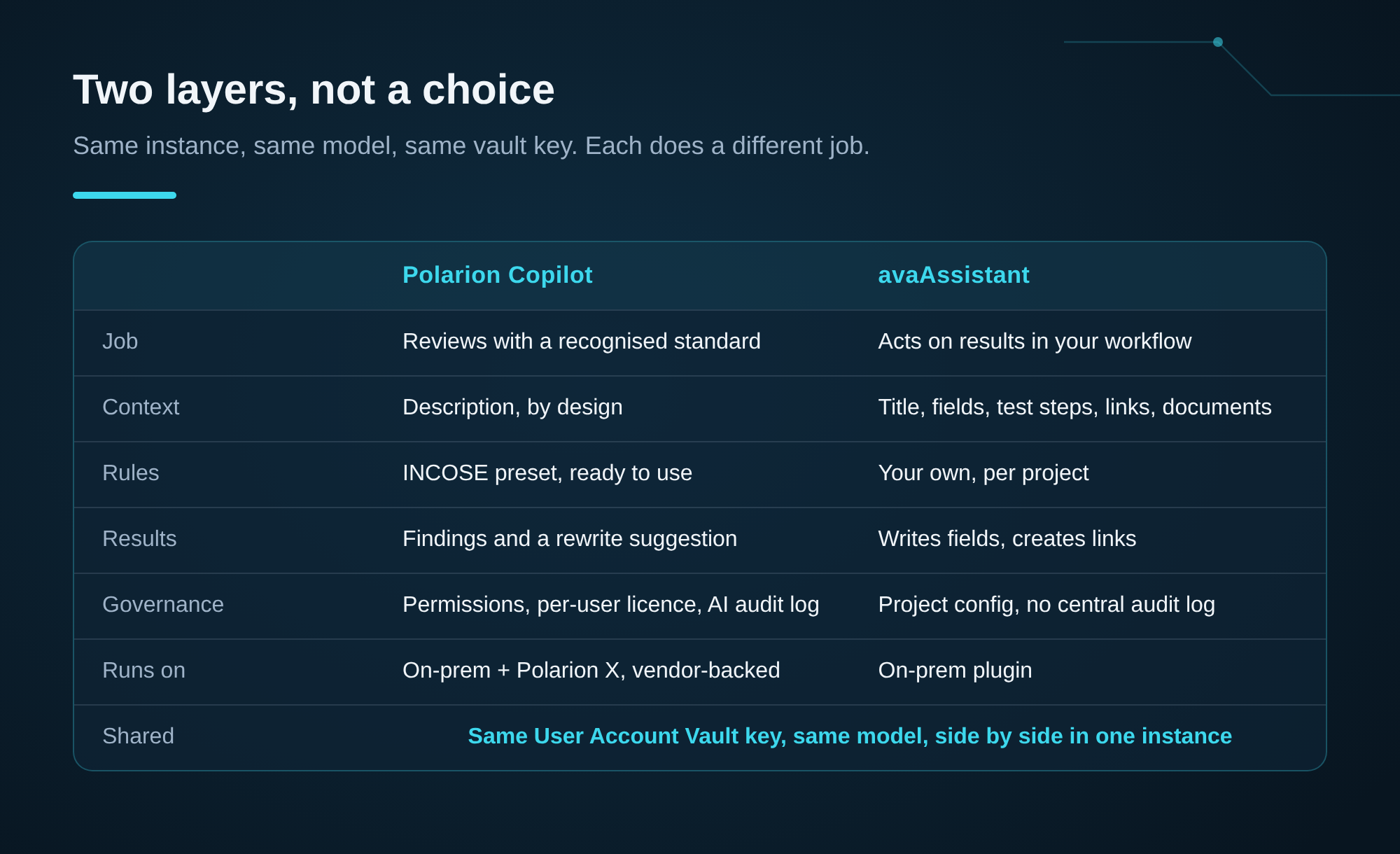
Copilot is the reviewing layer: vendor-supported, native in the UI, available on hosted Polarion X, with the INCOSE preset, permissions and the AI audit log built in. Those are real strengths, and governance in particular is something I'd want first if I were a quality manager.
avaAssistant is the acting layer: it writes field content, creates links with reasons, validates against rules you define per project, and works with titles, fields, test steps and documents. In my test, its coverage check is what flagged the requirement with the incomplete test case, simply because it reads the test steps. What it doesn't have: a central AI audit view like Copilot's, and it doesn't run on Polarion X.
The part I like most: they share infrastructure. Both can read the same API key from Polarion's User Account Vault, so a team can use Copilot for INCOSE checks and avaAssistant for project rules and write-back without configuring two worlds. That also shapes how I think about avaAssistant's roadmap. The goal isn't to rebuild what Copilot already does well. It's to add value next to it: deeper context, project-specific rules and actions. And where it makes sense, I'd like avaAssistant to build on the same model configuration Polarion now provides.
Getting the most out of Copilot
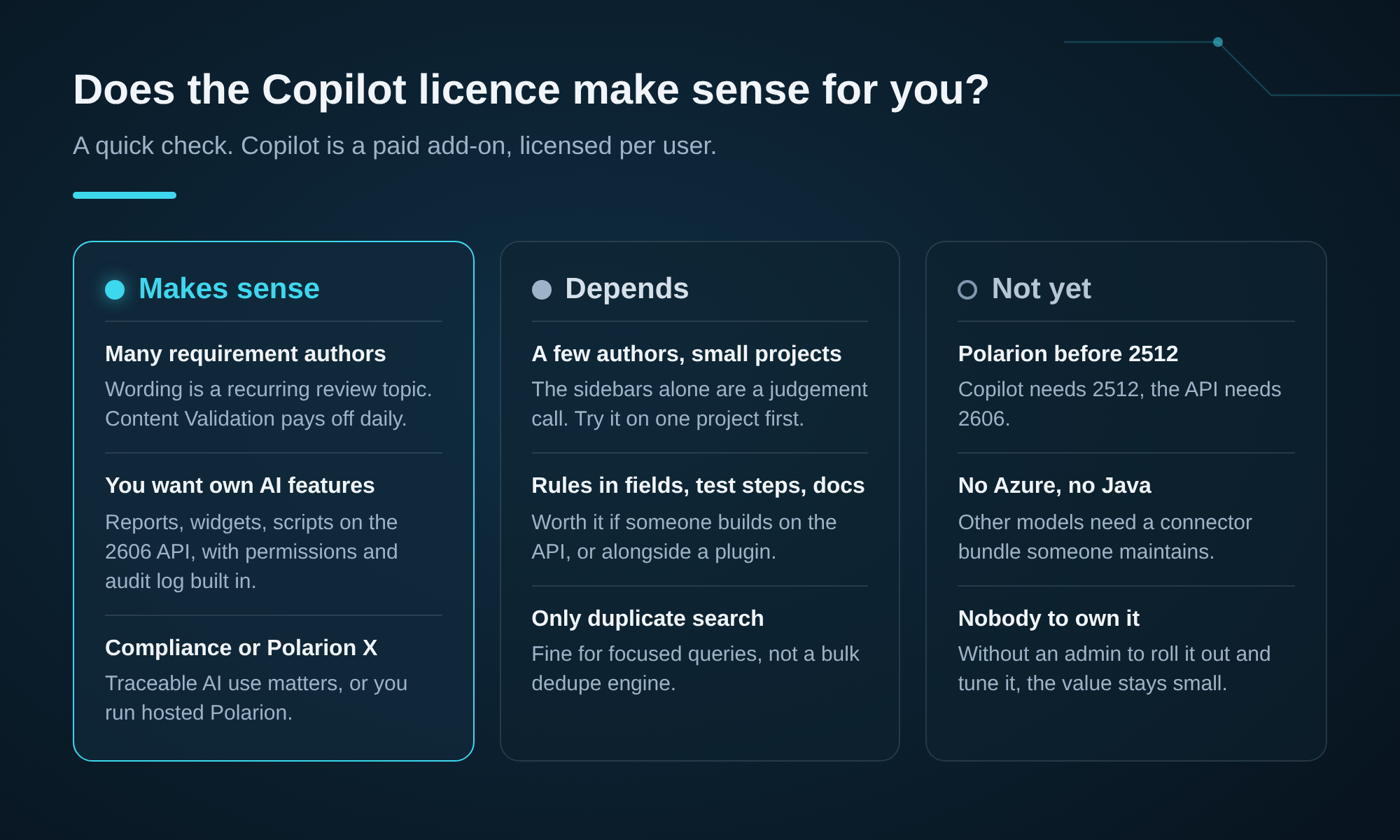
- Start with Content Validation. It's the quickest visible win: better requirement wording, with a standard reviewers already recognise.
- Know where your quality rules live. Rules about wording fit the built-in checks. Rules in custom fields, test steps or documents are a job for the API or a plugin.
- Tune Similarity. It scores candidates in one prompt, so ask your admin to set the result count and score threshold (Configuration Properties) to what your reviewers actually look at.
- Pick your model early. Azure OpenAI works out of the box. Anything else is a small Java connector you maintain across upgrades.
- Give someone the API. One developer who writes Velocity or scripts can turn the 2606 API into project-specific checks and reports, with permissions and audit log included.
What I'd like to see in 2612 and beyond
In "The Same Ticket, Four Times" I wrote that Siemens is bringing the model to the reviewer with four hundred requirements, the person who will never install an MCP server. After testing it, I think that's exactly the right direction, and the bigger audience. In December I said: apply healthy skepticism. Ten months later, the checks hold up to it, and the API is better than I expected. Copilot is a paid add-on with per-user licences: for Content Validation alone that's a judgement call per team, with the 2606 API it becomes a platform decision, and that's the version I'd budget for.
2512 laid the foundation, 2606 opened it up. That's a fast pace for a platform like Polarion, and it makes me curious about the next steps. Siemens hasn't said what 2612 brings, so this is my wish list, not a roadmap: richer context in the built-in checks, a way to go from a finding to a change, and streaming and tool calling in the API. Every one of those would make Copilot more useful on its own, and every one makes it a better base for everything built next to it, including what I build with avasis.
Have you switched Copilot on in your instance? I'd really like to know which of the three features your reviewers use, and what you'd build on the API first.
Polarion and Polarion Copilot are trademarks of Siemens. This is an independent test, not affiliated with or endorsed by Siemens. Measurements are from one test instance and one model and will vary with yours.